01
Use the access you already have
Start at an existing meter or valve with a suitable 2-inch test port. Bring water-quality monitoring to a known, accessible point in the distribution network.

Distribution water quality · Sensus AMI
Install a Halogen sensor directly through a 2-inch test port on an existing meter or valve. Send water-quality measurements back over your Sensus AMI network.
The compact assembly typically fits inside the existing meter box—making use of infrastructure your utility already knows, owns and can access.
Plan a test-port installation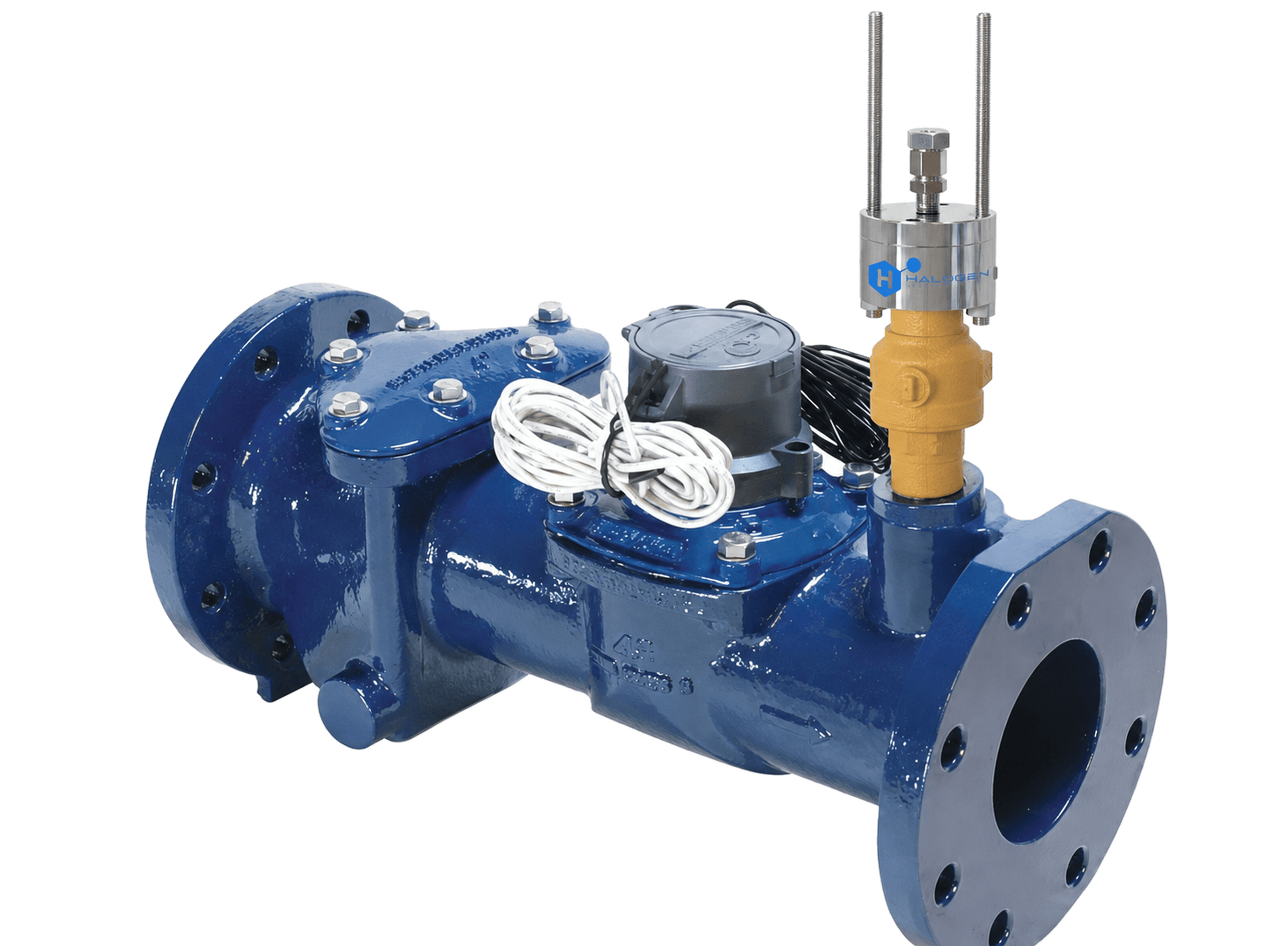
Existing test-port connection
Operating pressure for the specified assembly
Typically fits in the existing meter enclosure
Use the existing location
A suitable test port can remove the need to find and expose a buried line or build a separate sensor vault. The OMNI valve arrangement shown above gives the sensor a direct entry point into the water, while the existing meter box can house the compact installation.
01
Start at an existing meter or valve with a suitable 2-inch test port. Bring water-quality monitoring to a known, accessible point in the distribution network.
02
The Halogen wet-tap assembly places the sensor directly into the flow through the test-port connection. Specify the valve, sensor extension and insertion depth for the assembly.
03
A compatible Halogen interface and AMI gateway carry selected measurements back to your utility platform. Sensus FlexNet is one supported integration path.
Add water-quality measurements alongside the meter data you already collect. Select the sensor for free chlorine or monochloramine and the additional parameters your utility needs, including pH, conductivity and temperature.
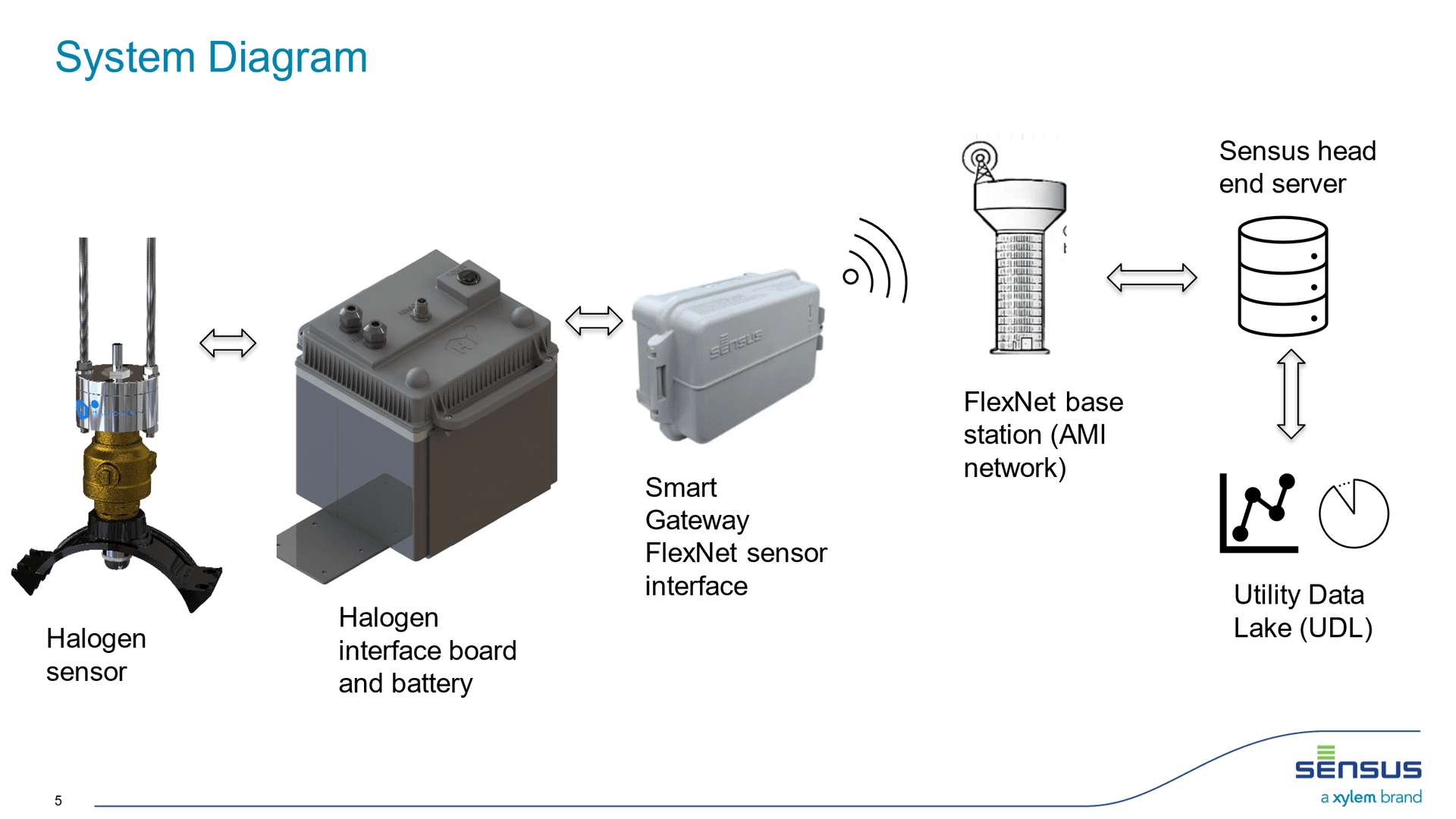
For Sensus, the Halogen interface connects to compatible Smart Gateway hardware and the FlexNet network. Other AMI networks can also provide the data path when the interface, gateway and receiving platform support the selected signals.
Sensor measurement frequency and AMI reporting intervals are separate settings. Match the transmitted parameters, gateway channels and reporting schedule to your monitoring objectives.
Confirm the 2-inch connection, compatible valve, sensor reach and pressure rating up to 10 bar. Check both operating clearance inside the box and the space needed to insert and remove the sensor.
Choose the parameters, interface, gateway channels and power supply. Confirm AMI coverage and platform provisioning. The four-signal Sensus configuration uses two Smart Gateways; channel allocation depends on the selected setup.
Field account · Gainesville, Georgia
The Gainesville account describes Halogen sensors connected through the Sensus FlexNet network to support distribution monitoring and demand-based flushing. Sensor measurements and AMI reporting intervals are separate settings.
Read the existing Gainesville online white paperThe OMNI PDF above is an installation drawing. A separate Gainesville success-story PDF is not linked here.
Bring water-quality measurements into the network your utility already uses. A useful proposal starts with the residual you need to measure, the installation location and the signals your operations team needs to see.
Define free chlorine, total chlorine or monochloramine requirements, then select additional parameters such as pH, temperature or conductivity. Confirm the sensor model and output selection together.
Review pipe access, existing sample taps, installation pressure, vault conditions and power. Existing access points can simplify installation. Verify wet-tap or OMNI meter compatibility against the installation drawing.
Coordinate gateway channels, FlexNet coverage, reporting intervals and data-platform access with your Sensus provider. Agree who commissions the sensor, gateway and receiving system.
Tell us your water type, desired parameters, number of monitoring points, available power and whether your utility already operates Sensus FlexNet. We can help define the sensor and interface scope for a project quote.
Plan my Sensus AMI installationYes. A suitable 2-inch test port on an existing meter or valve can accept the specified Halogen wet-tap assembly, with operation up to 10 bar. Confirm the connection, valve, sensor extension and insertion clearance for the actual installation.
The compact installation typically fits inside an existing meter box. Confirm box dimensions and the clearance needed for installation and sensor removal before selecting the assembly.
Using a suitable existing test port can avoid a separate sensor vault and the work of locating and exposing the buried line. Site access, the port arrangement and available clearance determine what work is needed.
Yes, with a compatible interface and gateway. Confirm supported signal types, channel mapping, power, network coverage and utility-platform integration for the chosen AMI network.
Yes. A compatible Halogen sensor and interface can send selected water-quality signals through Sensus Smart Gateways over the FlexNet AMI network. Confirm sensor outputs, gateway channels, network coverage and the receiving utility platform for each installation.
A typical installation includes a Halogen multiparameter sensor, a suitable power supply, a Bluetooth/4–20 mA SmartBox interface and Sensus Smart Gateway hardware. The installation method, interface version and output mapping are selected for the project.
For the four-signal SmartBox configuration, plan for two Smart Gateways. Select the transmitted parameters first and confirm the supported channels with Halogen and your Sensus provider. The number of parameters measured by a sensor is not the number automatically transmitted by one gateway.
Battery and solar-supported configurations can be considered for remote sites. Specify the appropriate low-power sensor and size the power system around the measurement schedule, transmission interval and site conditions. Battery endurance must be confirmed for the selected configuration.
Residual trends can inform when and where flushing is needed. Automatic flushing also requires compatible valves, metering, control logic and utility-approved operating limits. Adding a sensor alone does not create an automatic flushing system.
AMI can extend visibility to distribution points outside an existing SCADA system. Treat it as a complementary data path; assess reporting intervals, alarm handling and control requirements with your utility team.
Share the meter or valve model, a photo of the test port and the meter-box dimensions. We will help specify the sensor assembly and AMI connection.
Plan my AMI installation